svahsim Script Language Reference
v0.5.2.86
Table of Contents
- 1. Introduction
- 2. Two-Process Test Architecture
- 3. Structure of a Script File
- 4. Configuration Directives
- 5. Rule Directives (
ON) - 6. Timeline Directives (
AT) - 7. Assertion Directives (
EXPECT) - 8. Bus-Loss Detection Without a Script Change (
--bus-timeout) - 9. Operating Modes
- 10. Interactive Mode Commands
- 11. Complete Example
1. Introduction
This document is the reference for the svahsim simulator script
language. Script files carry the .svs extension (Svah Simulator
Script) and live in the ~~ directory at the project root.
A script defines the behaviour of a simulated ODrive axis: how it reacts to incoming commands, what it emits spontaneously on the CAN bus, and what the test framework must observe within given deadlines.
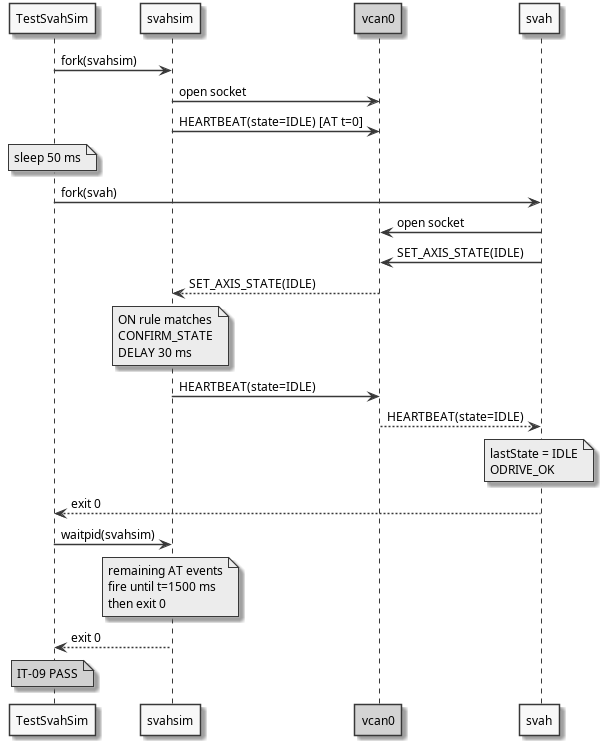
2. Two-Process Test Architecture
svahsim is designed to run alongside svah (or any other
application using libsvah) on a shared CAN interface, forming a
two-process test system without physical hardware.
| Role | Process | Behaviour |
|---|---|---|
| ODrive emulator | svahsim |
Reacts to CANSimple commands; emits heartbeats and encoder estimates |
| Host application | svah (or integrator code) |
Sends commands; waits for responses |
| Shared medium | vcan0 |
SocketCAN virtual interface; all frames visible to all sockets |
| Test harness | TestSvahSim |
Forks both; evaluates exit codes and assertions |
SocketCAN loopback behaviour: any frame transmitted on vcan0 is
received by every socket bound to that interface, including the
sender's own socket. This makes it possible for svahsim to observe
all frames sent by svah and vice versa.
2.1. Sequence diagram — IT-09 (two-process end-to-end)
See also IT-09 in TestPlan.org for the full test description and pass criteria.
3. Structure of a Script File
A script file consists of four sections, in order:
- Configuration — axis identity and physical parameters.
- Rules — reactive behaviour: what to emit when a command arrives.
- Timeline — proactive behaviour: what to emit at specific times.
- Assertions — what the host program must send and when.
Sections need not be separated by blank lines but must appear in the above order for predictable behaviour. All directives are case-sensitive.
3.1. Comments
Lines whose first non-whitespace character is # are comments and
are ignored by the parser. Inline comments (end-of-line #) are
also supported.
# This is a full-line comment
AXIS 0   # This is an inline comment
3.2. Blank lines
Blank lines are ignored and may be used freely for readability.
4. Configuration Directives
Configuration directives must appear before any rules, timeline events, or assertions. If a directive is omitted its default value applies.
| Directive | Default | Description |
|---|---|---|
AXIS id |
0 | CANSimple axis node id (0..62) |
INTERFACE iface |
vcan0 |
CAN network interface name |
BITRATE bps |
250000 | Bus bitrate in bits/s (informational) |
HB_RATE hz |
10 | Heartbeat emission rate in Hz |
ENC_RATE hz |
10 | Encoder estimate emission rate in Hz |
INIT_STATE state |
IDLE |
Initial axis state (IDLE or CLOSED_LOOP) |
VEL_LIMIT f |
2.0 | Velocity limit in turns/s |
CURRENT_LIMIT f |
10.0 | Current limit in A |
TRAJ_VEL_LIMIT f |
2.0 | Trajectory max velocity in turns/s |
TRAJ_ACCEL_LIMIT f |
5.0 | Trajectory acceleration in turns/s² |
TRAJ_DECEL_LIMIT f |
5.0 | Trajectory deceleration in turns/s² |
Example:
AXIS          0
INTERFACE     vcan0
BITRATE       250000
HB_RATE       10
ENC_RATE      20
INIT_STATE    IDLE
VEL_LIMIT     1.0
CURRENT_LIMIT 10.0
TRAJ_VEL_LIMIT    1.0
TRAJ_ACCEL_LIMIT  2.0
TRAJ_DECEL_LIMIT  2.0
5. Rule Directives (ON)
Rules define reactive behaviour: when the simulator receives a command, it evaluates rules in declaration order and executes the first matching rule.
5.1. Syntax
ON <cmd> [COND state=<N>] DO <action> [DELAY <ms>]
5.2. Commands (cmd)
| Command name | CANSimple cmd_id | Description |
|---|---|---|
SET_AXIS_STATE |
0x007 | Request axis state transition |
SET_INPUT_POS |
0x00C | Position setpoint |
SET_INPUT_VEL |
0x00D | Velocity setpoint |
SET_INPUT_TORQUE |
0x00E | Torque setpoint |
SET_LIMITS |
0x00F | Velocity and current limits |
SET_CONTROLLER_MODE |
0x00B | Control mode and input mode |
CLEAR_ERRORS |
0x018 | Clear axis errors |
WATCHDOG_FEED |
0x009 (RTR) | Encoder estimates RTR |
ANY |
— | Matches any command |
5.3. Optional condition (COND state=N)
When present, the rule fires only if the simulated axis is in the
specified state. N is an integer corresponding to AxisState:
N |
State |
|---|---|
| 1 | AXIS_STATE_IDLE |
| 8 | AXIS_STATE_CLOSED_LOOP_CONTROL |
5.4. Actions
| Action | Description |
|---|---|
CONFIRM_STATE |
Read requested state from the received frame; update |
| simulated state; emit Heartbeat confirming the new state | |
CLEAR_STATE |
Clear error flags; set state to IDLE; emit Heartbeat |
TRACK_POS |
Start trapezoidal position tracking toward received |
| setpoint; emit Encoder_Estimates cyclically | |
TRACK_VEL |
Set velocity setpoint; emit Encoder_Estimates cyclically |
TRACK_TRQ |
Record torque setpoint (simplified — no physics model) |
NOP |
Ignore the command silently |
5.5. Optional delay (DELAY ms)
Insert a pause of ms milliseconds before emitting the response.
Useful to simulate processing latency (e.g. ODrive typically
transitions state within 10–100 ms).
5.6. Example rules
# Respond to any state transition request with confirmation
ON SET_AXIS_STATE                        DO CONFIRM_STATE  DELAY 50

# Track position only when in closed-loop
ON SET_INPUT_POS  COND state=8           DO TRACK_POS

# Ignore limits silently
ON SET_LIMITS                            DO NOP

# Clear errors and return to IDLE
ON CLEAR_ERRORS                          DO CLEAR_STATE
6. Timeline Directives (AT)
Timeline events fire at a specified time (in milliseconds) relative to the script start. They are used for proactive emissions and for injecting error conditions.
6.1. Syntax
AT <t_ms> <action> [field=value ...]
6.2. Actions and fields
6.2.1. HEARTBEAT
Emit a Heartbeat frame.
| Field | Default | Description |
|---|---|---|
state=N |
1 (IDLE) | Axis state (integer) |
error=0x... |
0 | Axis error flags (hex or decimal) |
traj=0 |
0 | Trajectory done flag (0 or 1) |
AT    0   HEARTBEAT state=1 error=0 traj=0
AT 2500   HEARTBEAT state=8 error=0 traj=1
6.2.2. ENCODER
Emit a Get_Encoder_Estimates frame with specified values.
Also sets the simulator's internal position and velocity.
| Field | Default | Description |
|---|---|---|
pos=f |
0.0 | Position estimate in turns |
vel=f |
0.0 | Velocity estimate in turns/s |
AT  200   ENCODER pos=0.0 vel=0.0
AT 3000   ENCODER pos=1.5 vel=0.0
6.2.3. INJECT_ERROR
Set axis error flags. The simulator transitions to IDLE and emits a Heartbeat with the error flags set.
| Field | Required | Description |
|---|---|---|
error=0x... |
yes | Error flags (hex) |
AT 2000 INJECT_ERROR error=0x00000001
6.2.4. INJECT_CLEAR
Clear axis error flags. Emits a Heartbeat with error=0.
AT 3500 INJECT_CLEAR
7. Assertion Directives (EXPECT)
Assertions specify what the host program must send and within what
time. A script with at least one EXPECT directive runs in
assertion mode; a script without any runs in play mode (always
reports PASS).
7.1. Syntax
EXPECT <cmd> [state=<N>] WITHIN <ms>
7.2. Behaviour
Each EXPECT is assigned a deadline at script start (WITHIN ms
from the start). When the simulator receives a matching frame
before the deadline, the assertion is satisfied. If the deadline
expires before the frame arrives, the assertion fails.
The state=N field applies only to SET_AXIS_STATE frames: the
assertion is satisfied only if the received frame requests the
specified state.
7.3. Example assertions
# The host must request closed-loop within 3 s
EXPECT SET_AXIS_STATE state=8 WITHIN 3000

# The host must send a position setpoint within 1 s of closed-loop
EXPECT SET_INPUT_POS          WITHIN 1000

# The host must clear errors within 5 s of error injection
EXPECT CLEAR_ERRORS           WITHIN 5000

# The host must return to IDLE within 10 s
EXPECT SET_AXIS_STATE state=1 WITHIN 10000
7.4. EXPECT CONNECTED — bus liveness assertion
CONNECTED is a special assertion command that does not match a
received frame. Instead it asserts that the CAN bus stays alive
for the whole run: that no gap between successful I/O operations
(any send or receive) ever exceeds the WITHIN window.
# The bus must never go silent for more than 2 s
EXPECT CONNECTED WITHIN 2000
Semantics:
- While I/O keeps happening within the window, the assertion is pending (the simulator keeps running its timeline).
- If the I/O gap exceeds
WITHINms at any point — for example because the CAN cable was disconnected — the assertion fails and the simulator reports FAIL and exits non-zero. - If the timeline completes with the bus still alive, the assertion is satisfied (PASS).
This makes the simulator side of a bus-disruption test (PI-05)
symmetric with the application side: both ends detect the
disconnect. See BusWatch.svs for a complete example.
CONNECTED is the first member of an intended family of liveness
and traffic assertions (see FutureResearch.org for candidates such
as EXPECT RATE and EXPECT SILENCE).
8. Bus-Loss Detection Without a Script Change (--bus-timeout)
Independently of the .svs language, svahsim accepts a
--bus-timeout MS command-line option. When set to a non-zero value,
the simulator exits non-zero if no successful CAN I/O occurs within
MS milliseconds, regardless of the script's content.
# Give any existing play-mode script bus-loss detection:
svahsim --interface can0 --bus-timeout 2000 LongCycle.svs
This is the lightweight alternative to EXPECT CONNECTED: it adds
disconnect detection to any script — including play-mode scripts
that carry no assertions — without editing the script. Use
EXPECT CONNECTED when the liveness requirement belongs in the
script as a documented assertion; use --bus-timeout when you want
to wrap an existing script with a timeout at invocation time.
When a TRACK_POS action is triggered, the simulator engages a
trapezoidal trajectory from the current position to the received
setpoint.
The trajectory has three phases:
- Acceleration — velocity increases at
TRAJ_ACCEL_LIMITturns/s² towardTRAJ_VEL_LIMIT. - Cruise — velocity held at
TRAJ_VEL_LIMIT. - Deceleration — velocity decreases at
TRAJ_DECEL_LIMITturns/s² to arrive at the setpoint with zero velocity.
At each loop tick (5 ms), the stopping distance from the current velocity is compared to the remaining distance to the setpoint. If the motor cannot stop in time, the deceleration phase begins immediately (asymmetric profile).
Position and velocity estimates follow the trajectory continuously
and are emitted at ENC_RATE Hz. The traj_done flag in the
Heartbeat is set when position error and velocity are both below
the convergence threshold (0.5 mturns, 0.5 mturns/s).
9. Operating Modes
9.1. Play mode (no EXPECT directives)
The simulator runs until all timeline events have fired, then exits.
Exit status is always 0 (PASS). Useful for manual inspection with
candump or during protocol development.
9.2. Assertion mode (one or more EXPECT directives)
The simulator runs until all assertions are either satisfied or expired. Exit status is 0 (PASS) if all assertions were satisfied; 1 (FAIL) if any assertion expired unsatisfied.
10. Interactive Mode Commands
In interactive mode (svahsim without script arguments), all
directives from the script language are accepted at the prompt.
Additional commands are available:
| Command | Description |
|---|---|
start |
Start the event loop (Ctrl-C to stop) |
status |
Print current simulated axis state |
run <script.svs> |
Execute a script file |
help |
Print command summary |
quit / exit |
Exit svahsim |
Immediate action commands (usable without start):
HEARTBEAT state=1 error=0
ENCODER pos=1.5 vel=0.0
INJECT_ERROR error=0x00000001
INJECT_CLEAR
Rules and configuration directives set up the simulator state for
the next start invocation.
11. Complete Example
# NormalCycle.svs — IDLE → closed-loop → position setpoint → IDLE

AXIS          0
INTERFACE     vcan0
BITRATE       250000
HB_RATE       10
ENC_RATE      10
INIT_STATE    IDLE
VEL_LIMIT     2.0
CURRENT_LIMIT 10.0
TRAJ_VEL_LIMIT    2.0
TRAJ_ACCEL_LIMIT  5.0
TRAJ_DECEL_LIMIT  5.0

ON SET_AXIS_STATE                        DO CONFIRM_STATE  DELAY 50
ON SET_INPUT_POS  COND state=8           DO TRACK_POS
ON SET_INPUT_VEL  COND state=8           DO TRACK_VEL
ON CLEAR_ERRORS                          DO CLEAR_STATE
ON SET_LIMITS                            DO NOP
ON SET_CONTROLLER_MODE                   DO NOP

AT    0   HEARTBEAT state=1 error=0 traj=0
AT  200   ENCODER pos=0.0 vel=0.0

EXPECT SET_AXIS_STATE state=8 WITHIN 3000
EXPECT SET_INPUT_POS          WITHIN 1000
EXPECT SET_AXIS_STATE state=1 WITHIN 5000